
Are you wondering if you can use your smart refrigerator without Wi-Fi? You’re not alone.
As technology becomes a bigger part of our daily lives, more people are asking the same question. Maybe you’re moving to a new place without internet access or perhaps you’re concerned about privacy and want to keep things offline. Whatever your reason, you’re here because you need answers.
Understanding how your smart refrigerator functions without Wi-Fi can help you make the most of your appliance, even when you’re disconnected. Stick around, because we’re diving into what you can and cannot do with a smart fridge in offline mode. This information could change how you use your kitchen’s coolest gadget.
Smart Fridge Features
Smart refrigerators bring a new level of convenience to your kitchen with features designed to make food storage and management easier. These appliances combine traditional cooling with technology to offer functions like inventory tracking, recipe suggestions, and even touchscreens for notes or calendars. But how much of this functionality depends on being connected to WiFi?
Connectivity Requirements
Most smart fridge features rely heavily on a stable WiFi connection. This connection allows the fridge to sync with apps on your phone, update grocery lists, and receive software updates that improve performance. Without WiFi, you lose access to cloud-based services that enable features like remote temperature control and voice assistant integration.
Some models require WiFi for internal cameras that let you see inside your fridge remotely. Others use the internet to provide expiration alerts or suggest recipes based on what’s inside. If your WiFi goes down, these smart capabilities pause, but the fridge still keeps your food cold.
Offline Functionality
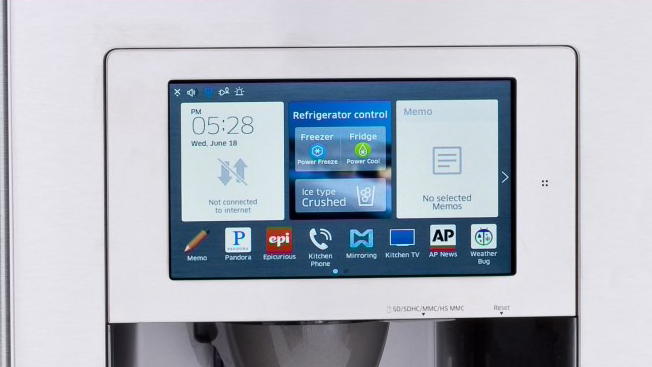
Even without WiFi, your smart refrigerator continues to perform its core job: keeping food fresh. Basic functions like temperature control, ice making, and lighting remain fully operational. You can still use physical controls on the fridge door or touchscreen to adjust settings manually.
However, features like syncing shopping lists or receiving notifications won’t work offline. Some fridges store recent data locally, so you might still access limited information about your inventory or settings. Have you noticed how some smart devices still offer a good user experience even when disconnected? Your fridge can too, but with fewer bells and whistles.
Credit: www.consumerreports.org
Basic Operations Without Wifi
Even without a WiFi connection, your smart refrigerator still performs many essential functions. It’s easy to overlook how much of its core work doesn’t rely on the internet. Understanding what you can and can’t do offline helps you stay prepared during network outages or when setting up in a new place.
Cooling And Temperature Control
Your smart fridge continues to cool your food and keep it fresh without WiFi. The built-in thermostat operates independently, maintaining the set temperature automatically.
You can manually adjust the temperature using the physical control panel or touchscreen on the fridge. This means you won’t lose control over food safety even if your internet goes down.
Have you ever thought about how your fridge knows when to turn the compressor on and off? It uses internal sensors that function without needing a network connection.
Internal Lighting And Alerts
The internal lighting inside the refrigerator remains fully functional without WiFi. Opening the door will still trigger the light to turn on, helping you find what you need easily in the dark.
Basic alerts like door ajar warnings or high-temperature alarms also work offline. These alerts rely on internal sensors rather than cloud services.
However, you won’t receive notifications on your phone or remote device without internet. This means you’ll need to check the fridge directly to stay informed about any issues.
Limitations When Offline
Using your smart refrigerator without WiFi may seem like a minor inconvenience, but it actually limits many of its key features. While basic cooling and storage functions continue to work, the smart capabilities that set these fridges apart become restricted. Understanding these limitations helps you decide how crucial a constant internet connection really is for your daily use.
Loss Of Remote Access
Without WiFi, you lose the ability to control or monitor your refrigerator remotely. That means no more checking the fridge temperature from your phone or adjusting settings while you’re away. If you rely on alerts for things like leaving the door open, those won’t reach you either.
I remember once leaving my fridge door slightly ajar during a trip. Since my WiFi was down, I missed the notification and ended up with spoiled groceries. It made me realize how much I depend on remote access to avoid simple mistakes.
Unavailable Smart Apps
Smart refrigerators often come with apps that offer recipes, inventory tracking, and shopping list integration. Without WiFi, these apps either won’t work or will have limited functionality. You won’t get updates on your food stock or suggestions based on what’s inside your fridge.
Think about how useful it is to have your fridge remind you of expired items or suggest meals based on what you have. Without an internet connection, those helpful features disappear.
Impact On Updates And Maintenance
Software updates improve your fridge’s performance and security, but they require WiFi to download and install. Being offline means missing out on important bug fixes and new features. This can cause your fridge to become outdated or even vulnerable to glitches over time.
Regular maintenance alerts may also stop working without internet access, leaving you unaware of potential issues until they become serious. Are you prepared to manually check and troubleshoot your fridge without these automated reminders?
Alternatives To Wifi
If your smart refrigerator loses WiFi connection or you simply don’t have WiFi at home, you might wonder if you’re out of options. Luckily, there are practical alternatives that let you keep using many smart features without relying on a traditional WiFi network. These options help maintain convenience and control, even when your internet isn’t available.
Using Mobile Hotspots
You can connect your smart refrigerator to the internet by using a mobile hotspot from your smartphone or a dedicated device. This setup works well if you have good cellular coverage and a data plan that supports tethering.
Mobile hotspots give your fridge access to the internet almost anywhere. However, keep an eye on your data usage, especially if your fridge updates apps or downloads large files automatically. Have you ever experienced your phone’s hotspot cutting out at the worst moment? Planning your usage can avoid that frustration.
Bluetooth Connectivity
Some smart refrigerators allow limited functionality through Bluetooth connections. Unlike WiFi, Bluetooth has a shorter range but doesn’t require internet access.
Bluetooth lets you sync your fridge with your phone for basic tasks like controlling temperature or receiving alerts. This method works best if you’re close to the fridge, such as in your kitchen. Remember, Bluetooth won’t support remote monitoring when you’re away from home.
Manual Controls
Even without any wireless connection, your smart refrigerator still functions with manual controls. You can adjust temperature settings, activate modes, and access basic features directly on the fridge’s touchscreen or buttons.
This approach ensures your food stays fresh and your fridge operates efficiently, regardless of connectivity. Sometimes, going back to basics reminds you how reliable manual controls are, especially during internet outages or power issues.
Tips For Managing Smart Fridges Without Internet
Smart refrigerators offer many features that rely on internet connections. Without WiFi, some functions stop working. Managing your smart fridge offline requires simple habits and smart energy choices. These tips help maintain food safety and save power.
Regular Manual Checks
Check the temperature inside the fridge daily. Use a separate thermometer for accuracy. Inspect door seals for cracks or dirt. Clean seals to keep cold air inside. Look for frost buildup and defrost if needed. Keep an eye on food expiration dates. Rotate items to use older food first.
Optimizing Energy Use
Set the fridge temperature to 37–40°F for the fridge section. Keep the freezer at 0°F. Avoid opening the door often or for long times. Place the fridge away from heat sources or direct sunlight. Make sure the fridge has space around it for air flow. Clean the condenser coils regularly for better cooling. Use energy-saving modes if available offline.
Backup Power Solutions
Power outages can spoil food quickly. Use a portable battery backup or generator for short outages. Keep a cooler with ice packs ready for emergencies. Store non-perishable food items separately. Check the fridge power cord and plug for damage. Avoid unplugging the fridge during outages if possible. These steps keep food safe without internet features.

Credit: www.pcmag.com
Credit: www.samsung.com
Frequently Asked Questions
Can A Smart Fridge Work Without Wifi?
Yes, a smart fridge can work without wifi for basic functions like cooling and freezing. However, smart features like remote monitoring and notifications require wifi connectivity.
What Features Stop Without Wifi On Smart Fridges?
Without wifi, features like app control, voice commands, and real-time alerts stop working. The fridge still cools normally but loses smart connectivity benefits.
How To Use A Smart Refrigerator Offline?
To use offline, rely on manual controls on the fridge panel. You can still adjust temperature and settings without wifi, but smart apps won’t sync data.
Does Wifi Loss Affect Fridge Performance?
No, wifi loss does not affect core cooling performance. The fridge keeps food fresh, but smart features and updates won’t be accessible until wifi returns.
Conclusion
Smart refrigerators work without WiFi for basic functions. You can still keep food cold and fresh. Some features, like remote control, need an internet connection. Offline use limits smart options but does not stop the fridge. Choose a model that fits your WiFi habits.
Think about what features matter most to you. This helps you get the best use from your fridge. Smart or not, a fridge keeps your food safe. That’s the main goal, with or without WiFi.